ezcorp inventory search
Bringing browse and discovery to a tablet POS app so pawn brokers can assist customers anywhere on the floor
00

problem
When EZCORP moved pawn brokers off the counter and onto the floor with tablets, the app only gave them one way to find inventory: enter an item number or use a generic bulk entry. That worked when items had tags — but pawn shop inventory is unpredictable. Tags go missing. Numbers get transposed. Customers describe what they want without knowing the exact item. And when a broker couldn't find what a customer needed quickly, the sale was lost. There was no way to search by keyword, no way to browse by category, and no way to surface similarly priced alternatives when an item didn't come up. Brokers were being sent to the floor without the tools to do their job there.
solution
A full inventory search and browse experience built into the tablet app — combining keyword search with real-time category suggestions, category-first browsing with subcategory navigation, filtering and sorting on results, and featured inventory on the search landing page to surface high-priority items proactively. Brokers can now find what a customer is asking for even without an item number, and can pivot to similar or comparably priced inventory when the exact item isn't available.
The constraint that shaped everything
I joined EZCorp as the outside vendor was being brought in-house, inheriting a product with an existing MVP and a team that was still building out its design process. User testing wasn't part of the standard workflow — direct access to pawn brokers in stores wasn't offered. That meant the search feature had to be designed primarily from stakeholder input, discovery sessions, and pattern research, with careful attention to how the physical environment of a pawn shop would affect how brokers actually used it.
The use case was specific and high-pressure: a broker standing on the floor with a customer in front of them, needing to find an item or a viable alternative in seconds. The design had to work fast and recover gracefully when it didn't find an exact match.
Two paths into inventory
The core design decision was supporting two distinct mental models for how a broker might look for something. Sometimes they know what the item is and want to type it in — keyword search. Sometimes they're starting broader, maybe a customer wants "something in jewelry under $100" — category browse. Both entry points needed to feel equally natural from the same landing screen.
The search landing page solved this with a split layout: featured inventory prominently on the left to surface items worth showing customers proactively, and a category rail on the right for brokers who wanted to start browsing. A persistent search bar anchored the top across all states, so either path was always one tap away.
Keyword search with live guidance
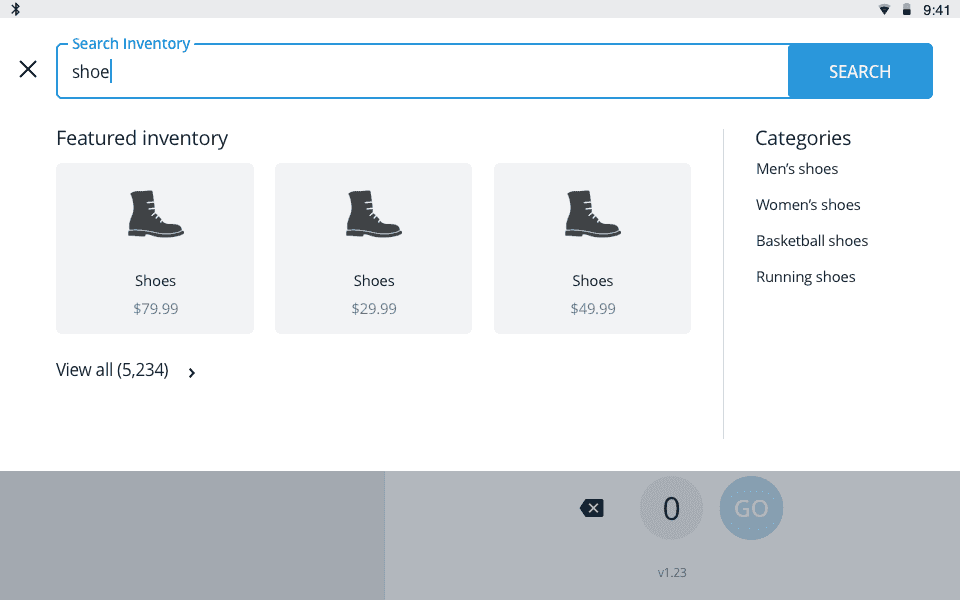
As a broker types, the interface responds immediately — featured items update to show relevant results, and the category rail shifts to show subcategories specific to what's being typed. Searching "shoe" surfaces shoe results in the featured panel alongside Men's shoes, Women's shoes, Basketball shoes, and Running shoes in the category rail. This pattern lets brokers narrow quickly without having to complete a full search first, and gives customers standing nearby something to react to in real time.
When results came back, brokers could filter and sort the grid, and drill into a product details overlay without losing their place in the results list — important when a customer wanted to compare a few options before deciding.
Handling no results
Empty states were a meaningful design problem given the nature of pawn inventory. When a keyword search returned nothing, the design needed to keep the broker moving rather than hitting a dead end. The Phase 2 roadmap included surfacing similar items and suggestions below the empty state message — giving brokers a recovery path and a reason to keep the customer engaged while they looked.
User flows
The flows I produced mapped both the keyword and category paths end-to-end, including the combined path where a broker started with a category and then narrowed with a keyword within it. Each path accounted for the results, no-results, filter/sort, and product detail states, giving engineering a complete picture of how the two entry points connected and where they overlapped.
year
2020
timeframe
1 month
tools
Sketch, Marvel
category
product design
01

02

03
04

05

06

07

08

09

010


