ezcorp payment experience
Designing split payment, loan and layaway management, and digital receipts for a tablet POS app used by 7,000+ pawn brokers across North and South America
00

problem
As EZCorp expanded its tablet POS app beyond basic retail sales, three interconnected payment problems needed to be solved. Customers frequently wanted to pay with both cash and a card — but the app had no way to handle split payments, and the underlying payment processor created a constraint that ruled out the most intuitive design approach. Loan and layaway payments were on the roadmap from the start, but the pandemic elevated them to urgent priority as store operations shifted. And once transactions completed, there was no digital receipt option — every interaction ended with a paper printout or nothing. Each problem was distinct. All shared the same stakes: real money, real customers standing at the counter, and no margin for confusion in the interaction.
solution
A suite of payment flow improvements that made transactions faster, more flexible, and more trustworthy: a split tender flow that guided brokers through card and cash amounts before processing; a layaway and loan management experience that surfaced each customer's full payment picture at a glance and supported bulk payment across multiple accounts; and a post-transaction receipt screen offering print, email, and text options. Each was designed within real operational and technical constraints — including a payment processor requirement that fundamentally shaped how split tender had to work.
My role and the team context
I joined this project as EZCorp transitioned design ownership in-house from an outside vendor. After the first MVP release, EZCorp retained some vendor development capacity but brought UX design internal. I came on as Lead UX Designer through that transition, becoming the primary design owner as the broader vendor team wound down — taking on not just execution but also the design process itself, including establishing how research and testing would work on a team that had previously relied entirely on stakeholder input.
Split tender: designing around a payment processor constraint
The most technically constrained design challenge was split tender — customers paying with both a credit card and cash in a single transaction. The intuitive flow would have let the customer put however much they wanted on the card, then handle the remaining cash balance afterward. That's how most consumer POS systems work.
FreedomPay, the payment processor handling card authorizations, didn't allow it. Once a card transaction was submitted and approved, it was final — the system completed the transaction on card approval, with no mechanism to collect a remaining cash balance afterward.
The design had to front-load the decision: the broker needed to determine the cash amount first, set the card amount, and confirm both before anything was submitted for processing. I worked with the product team to map this explicitly in the user flow — the FreedomPay handoff was treated as a hard constraint, not a happy-path assumption — so the design worked with the processor's architecture rather than against it. The result was a flow that felt deliberate and clear to brokers even though it asked them to confirm amounts in an order that wasn't immediately intuitive.
Layaway payments: surfacing the full picture
The layaway payment experience had to solve an information architecture problem before it could solve an interaction problem. Pawn shop customers often have multiple active layaways — sometimes at different store locations — in various states of health: current, due soon, past due, pending. Brokers needed to see all of that at once and take action without navigating between screens.
The design organized each customer's layaways in a scannable list with collapse/expand per account. Each row surfaced the layaway number, next payment amount, and due date in the collapsed state — enough for a broker to assess quickly. Expanding a row revealed the item contents, remaining payments, store location, and three payment options: Next Payment (pre-filled with the scheduled amount), Pay Balance (full payoff), and Custom Payment (editable amount). Past-due layaways were flagged with a LATE badge in red to prioritize attention without requiring the broker to read through every line.
The customer search results screen also had to handle real-world edge cases gracefully — customers with very long names that truncated to "..." with a Show more/less toggle, expired ID badges surfaced directly on the result card so brokers could flag compliance issues before proceeding, and layaway count badges that gave brokers a heads-up on what they'd find before opening the account.
For customers making payments on multiple layaways in a single visit, brokers could select Next Payment across accounts simultaneously — building a combined checkout total shown at the bottom of the screen and checking out all selected layaways at once.
The layaway cart itself showed two plan types — Basic and Promo — labeled clearly with badge tags, with the down payment amount and installment schedule displayed so customers could understand exactly what they were committing to.
Fighting for user testing — and what it revealed
User testing wasn't part of EZCorp's standard process, and direct access to pawn brokers in stores wasn't offered. I worked with the product owner to make the case, and for the loan and layaway payment features, we got it.
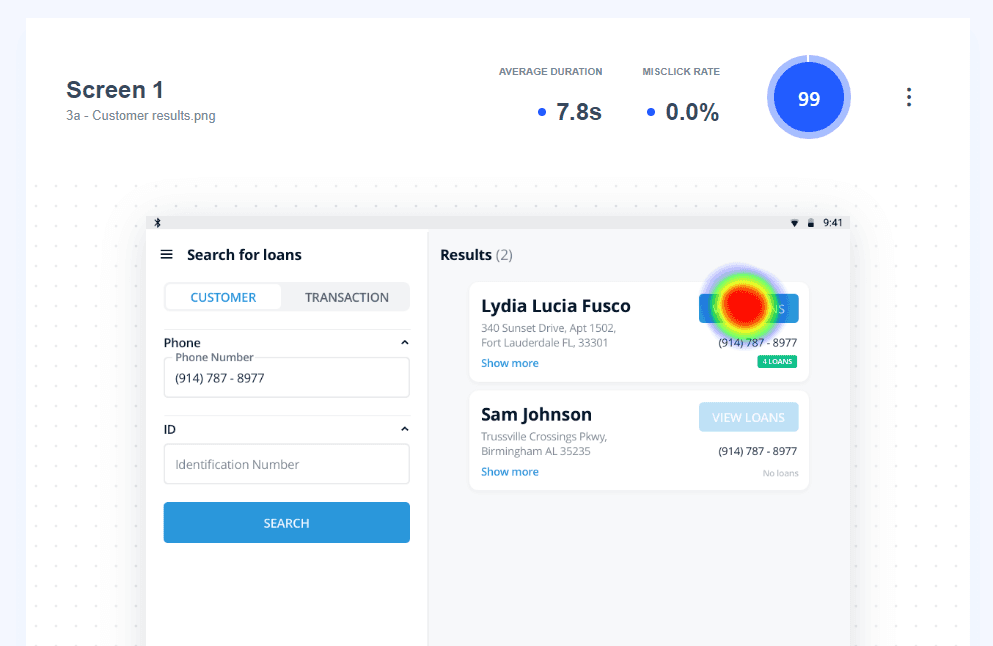
We ran prototype-based testing through Marvel and Maze, with real pawn brokers as participants. The customer search screen scored a 99/100 usability score — average task completion in 7.8 seconds, 0% misclick rate — validating the layout's clarity under real conditions. The loan extension flow scored 79/100 across four testers, with path analysis from Maze revealing where users diverged from the expected flow when extending multiple loans by the same number of days. That path data directly informed refinements before launch.
The heatmap and quantitative scores also gave the team evidence to justify future testing investment — seeing exactly where users clicked, and confirming that primary actions landed precisely where intended, shifted the business's posture toward treating testing as standard practice rather than an exception.
Email receipts: resolving the preference question
The receipt feature raised a design question before a pixel was placed: when should receipt preference be captured, and what should be required? A discovery session mapped the options — ask at checkout, auto-populate from account data, offer discrete choices post-transaction. The resolution was to surface receipt options on the post-transaction confirmation screen after the "Thank you" and total. Print Receipt, Email Receipt, and Finish appeared as equal-weight actions with no default and no required field.
Tapping Email Receipt expanded an inline email input with a Send button, pre-populated from the customer's account if an email was on file. Text receipt was explored as a third option but deprioritized based on operational feedback. The inline expansion approach kept the confirmation screen uncluttered while making the email path feel immediate — one tap to reveal exactly what was needed.

Loan payments and extensions: the hardest design problem in the project
Loan management was the most complex payment flow because the number of valid actions per loan was high, the financial stakes of each decision were real, and customers often had multiple active loans in different states — some due today, some in days, some at different store locations.
The loan list gave brokers a full view of a customer's portfolio at a glance: loan number, amount, items on collateral, due date, final due date, days remaining as a badge, and a per-loan Extend button with the daily rate surfaced directly — so brokers could give customers a cost estimate without opening anything. Loans due today were flagged in red with a TODAY badge to direct attention immediately.
The extension interaction itself required careful decisions about how to present flexibility without overwhelming. Each loan supported three extension types: daily extension by number of days (with a stepper, live amount calculation, and resulting new date); daily extension to a specific date via calendar picker; and monthly extension with discrete options showing the exact due date and total cost for 1 or 2 months. The extension panel showed the current due and final due dates, updated in real time as the broker adjusted the days or selected a monthly option, so both the broker and customer could see exactly what the new timeline would be before committing.
The design went through multiple iterations — the screens show exploration of overlay vs. full panel, border weight and color for the selected state, and placement of the updated due date information relative to the controls. These weren't cosmetic decisions: on a tablet held at arm's length with a customer watching, visual hierarchy and touch target clarity directly affected transaction speed and accuracy.
For bulk loan extension — extending all of a customer's loans by the same number of days in a single interaction — user testing through Maze revealed exactly where brokers struggled. With four testers and a task scenario of extending all of Lydia's loans by 7 days, the path analysis showed multiple diverging paths from the expected flow, pointing to specific points in the interaction where the bulk selection and application mechanic wasn't clear enough. A usability score of 79/100 on the Copy/Paste Loan Extension test quantified the gap and gave the team a concrete benchmark to improve against.
An earlier design exploration had taken a different approach to the loan list entirely — a denser row layout with item photography, showing Extend, Renew, and Pay Off as equal-weight options per loan with all costs visible without expanding. That exploration helped the team evaluate the tradeoffs between information density and scan ability before landing on the expand/collapse model that shipped.
year
2020
timeframe
4 months
tools
Sketch, Marvel, Maze
category
product design
01

02

03

04

05

06
07

08

09

010

011


